
inSmart POS for desktop
The till app for the computer at your counter: orders, tables, fiscal receipts and kitchen printers. Install it on your Windows computer.
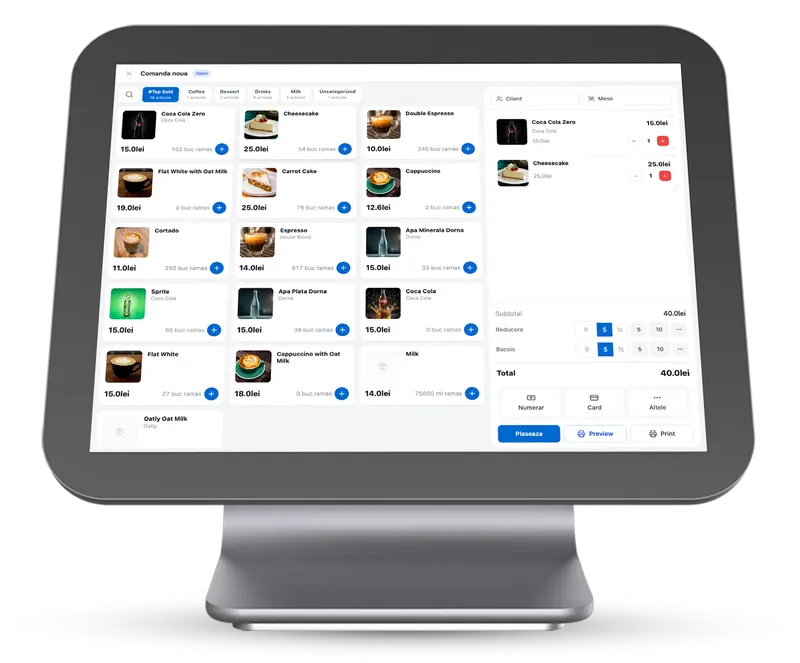
What the app does
Quick at the busiest hour
It runs right on the computer, so an order takes seconds even when the place is full.
Check in from home
Every order is saved to the cloud, so you can check sales from your phone or laptop.
Live floor plan
See every table with its order and guest requests: “call waiter” or “bill”.
Receipt printing
Fiscal receipts via FiscalNet or a direct Datecs connection, plus thermal printers for the kitchen.
Barcode scanner
Scan a product’s barcode and the POS finds it by its code.
Control per user
Roles and per-user permissions, manager approval for voids, and the history of every order.
System requirements
- Operating system
- Windows 10 (64-bit) or later
- RAM
- Minimum 4 GB (8 GB or more recommended)
- Disk space
- Minimum 500 MB free space
- Internet connection
- Required: data syncs to the cloud in real time
- Optional hardware
- Thermal printer, fiscal printer, barcode scanner
Start free. Add the rest when you need it.
Create your account in minutes and put the QR menu on your tables today. Turn on the POS, bookings and stock when you’re ready.